Real Estate & Compliance Automation · 7 MIN READ
Stop Chasing PDFs: Turning 30-Minute Insurance Reviews Into Zero-Touch Compliance

The Problem
One property manager we work with described her morning like this: the first two hours of every day go to chasing insurance certificates. Not managing properties. Chasing PDFs.
That is the bottleneck Kaneff Group set out to remove. Kaneff is a premier Canadian real estate developer and property management firm, with a portfolio spanning commercial, retail and residential assets. Certificate of Insurance (COI) tracking is one of their core defenses against liability — and for their property managers and administrative teams, it had become a severe operational drag.
Reviewing a single COI could take up to 30 minutes. A property manager had to pull data out of messy, unstructured formats — PDF ACORD forms, scanned JPEGs, carrier addendums — then cross-reference tenant names against lease agreements and verify policy limits, such as a $2M general liability minimum, the right additional insured wording, and a valid waiver of subrogation. Anything that failed the check kicked off a repetitive chain of follow-up emails to tenants and vendors, tracked by hand in a spreadsheet.
The shape of the problem is not unique to Kaneff:
- Roughly 70% of certificates are non-compliant on first receipt (source: IRMI) — each one needs three or more follow-up cycles before it is clean.
- Across the property teams we work with, a single manual review runs 15–30 minutes, and daily tracking, chasing and expiry monitoring consumes another 2–3 hours.
And the downside is not inconvenience. A mistakenly approved certificate is an uninsured liability sitting on the balance sheet until someone gets hurt. Meanwhile the legacy answer — COI portals — never actually solved the review problem. They moved the filing cabinet online, then charged vendors $100+ a year for the privilege of uploading a document. Somebody still had to read it.
The Solution
Kaneff deployed COI Agent, allNeurons’ autonomous compliance agent, to take over the review workflow end to end. The important word is autonomous: this is not a repository with alerts bolted on.
A tenant or contractor emails their certificate to a dedicated COI Agent inbox. No portal, no login, no vendor fee — a deliberate choice, because every portal we looked at solved the landlord’s filing problem by pushing work onto the tenant, which is exactly why adoption stalls. From there the agent ingests the email, extracts the certificate and its metadata, audits it against Kaneff’s own compliance checklist, writes and sends the follow-up when something is missing, and keeps escalating until a compliant certificate lands.
The part that actually matters: we did not point a language model at an ACORD form and ask “is this compliant?” A general-purpose model will answer that question fluently and give you no way to check it. Instead we encoded the property team’s own review procedure — which 23 items to check, what evidence counts for each one, where on the form that evidence normally lives, which variations are acceptable, and what to do when a document is ambiguous rather than clearly deficient. That is what makes the output repeatable and auditable instead of a well-worded guess.
The property administrator stays cc’d on every message and keeps full control. What changes is where their time goes: from keying data out of PDFs to reviewing flagged exceptions and handling tenant relationships. The role moves from data entry to final auditor. Results sync back into your system of record — Yardi, MRI and Procore, so the system of record stays current without double entry.
Deployment
Rolling COI Agent out is a guided deployment rather than a self-serve signup, because the checklist is the product — a generic checklist produces generic results. To run it against a portfolio you need:
- A dedicated COI inbox connected to the agent (an Entra ID / OAuth setup on the customer’s own email tenant).
- The compliance checklist configured. Kaneff’s runs 23 items across certificate and tenant information, property insurance, and general liability.
- Property, tenant and contractor data loaded — via Excel template, manual dashboard entry, or a live Yardi/MRI sync.
- Reminder cadence set for expiring, expired and rejected certificates (daily through custom frequency).
- A training and walkthrough session before go-live.
Every customer starts with a paid 15–30 day Proof of Concept on one or two buildings, or roughly 50–200 COIs. The point is to measure accuracy and hours saved on the customer’s real portfolio, with their real checklist, before anyone signs an annual contract.
Architecture
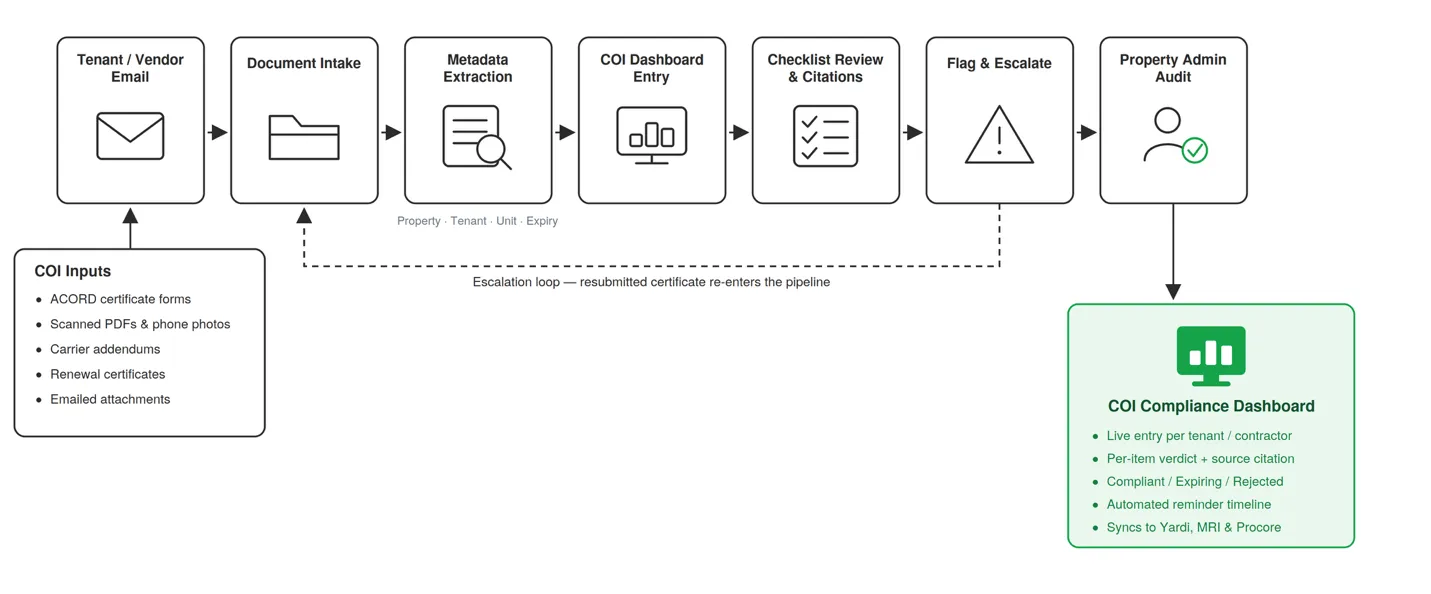
Step 1 — Ingest. The agent monitors a dedicated inbox and picks up each certificate as it arrives — PDF ACORD forms, scanned images, or photographs. Scanned and low-quality files go through OCR first, so a phone photo of a certificate is handled the same as a clean digital PDF.
Step 2 — Extract. It pulls property, tenant, unit, carrier, policy numbers, coverage limits, endorsements and expiry dates, and records where in the document each value came from.
Step 3 — Audit. It evaluates the certificate item by item against that customer’s configured checklist — not a generic one — and returns a per-item verdict with the supporting evidence attached.
Step 4 — Flag, don’t guess. Where the document genuinely does not support a conclusion, the agent flags it for human review instead of inventing one. An ambiguous certificate is a question for the administrator, not a coin flip.
Step 5 — Escalate. Non-compliant items trigger a specific, itemized follow-up naming the exact gap — “waiver of subrogation missing,” “additional insured incorrect” — on an escalating schedule, not a single email into the void.
Step 6 — Track and sync. The dashboard updates in real time, the property administrator stays cc’d on every exchange, and confirmed compliance status and expiry dates flow back into Yardi, MRI or Procore.
Three design decisions are worth calling out, because they are what separates this from a document classifier:
- Every compliance answer is tied to a location in the source document. The administrator can verify a call in seconds instead of re-reading the certificate — which is also what makes the output defensible in an audit.
- The agent works through email, the channel tenants and vendors already use. Zero learning curve on their side is the difference between a system that gets adopted and one that gets ignored.
- The human is a checkpoint, not a bottleneck. Nothing is marked compliant without an administrator being able to see why, but nothing waits on them to be read, extracted or chased.
Where This Has Helped
A typical case looks like this. A tenant emails a renewal certificate at 6pm. The agent picks it up, OCRs the scan, extracts the carrier, limits and expiry, and runs all 23 checks. General liability comes back at $2M — compliant. But the additional insured endorsement names the property management entity rather than the ownership entity named in the lease, and the certificate carries no waiver of subrogation.
By the time the property administrator opens their inbox the next morning, the follow-up has already gone out, naming both gaps specifically, with the administrator cc’d. What used to be a 30-minute read followed by a carefully worded email is now a flagged item they either confirm or override. If the tenant does not respond, the escalation continues without anyone remembering to chase it.
Kaneff is now extending COI Agent across its wider portfolio and using the platform’s analytics to filter non-compliant properties and identify high-risk tenants with a repeated history of non-compliance — a view that simply did not exist when the data lived in a spreadsheet.
Impact
Previously, every certificate ran through a property manager by hand:
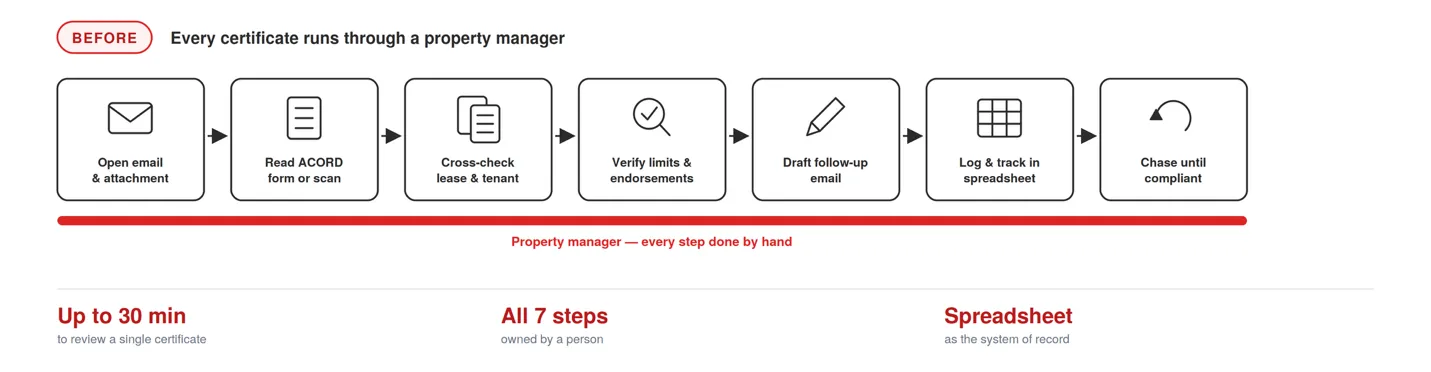
Inbox → open attachment → read ACORD form → cross-check lease → verify limits → draft follow-up → log in spreadsheet → repeat
With COI Agent:
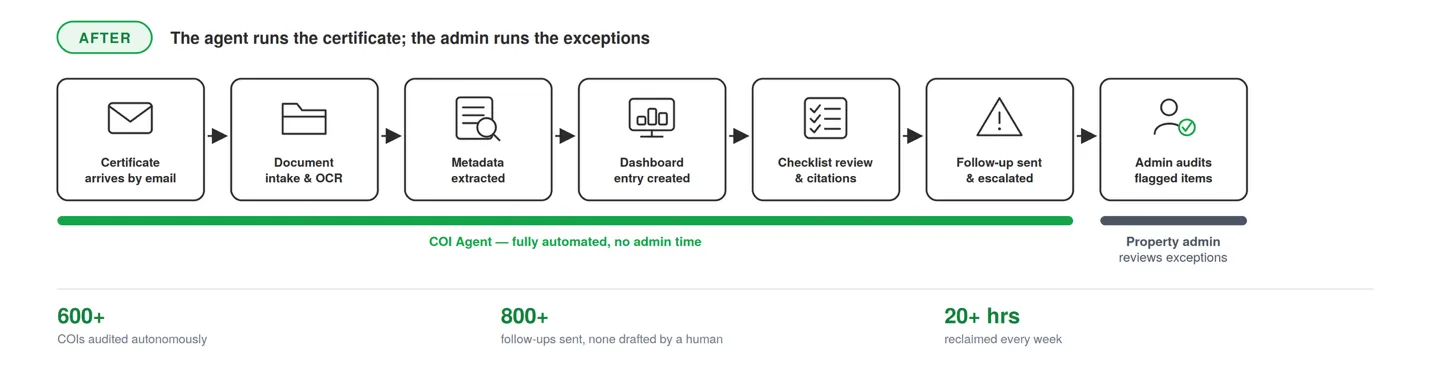
Tenant email → ingest and extract → audit against checklist → itemized follow-up if needed → dashboard and ERP updated → human reviews exceptions
| Metric | Before COI Agent | With COI Agent | Change |
|---|---|---|---|
| Review time per COI | Up to 30 min, manual | Reviewed on arrival, no queue | 30 min → 0 min of admin time |
| Follow-up emails | Drafted one by one | 800+ sent by the agent | 0 drafted by a human |
| Certificates processed | Bounded by admin capacity | 600+ audited autonomously | Capacity no longer the limit |
| Admin hours reclaimed | Spreadsheet + inbox tracking | 20+ hrs/week, ~25% WoW growth | 200+ hours eliminated to date |
| Manual data entry | Keyed from PDFs and scans | Extracted and cited to source | ~80% reduction |
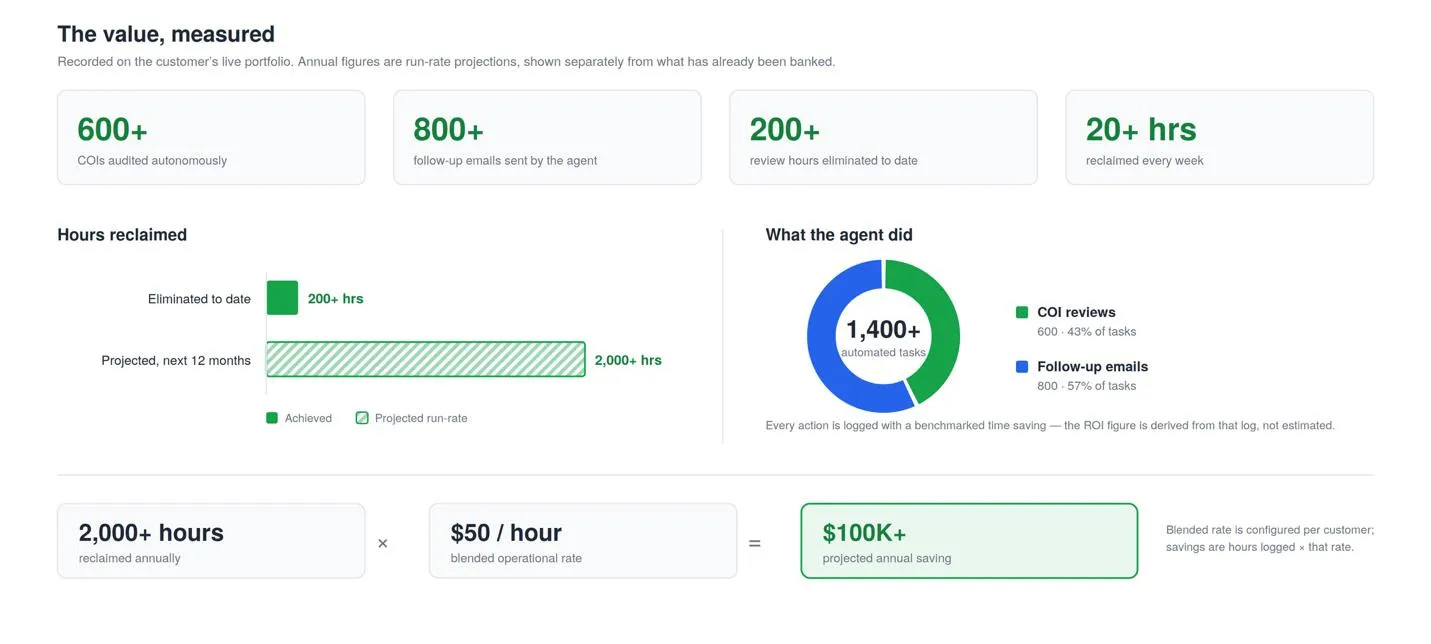
Kaneff is on track for 2,000+ hours and $100K+ in annual savings across the portfolio. The more useful way to read that number: the certificates were always going to need reviewing. The question was only whether a property manager’s day was the resource that paid for it.
What Leadership Sees: The AI Value Report
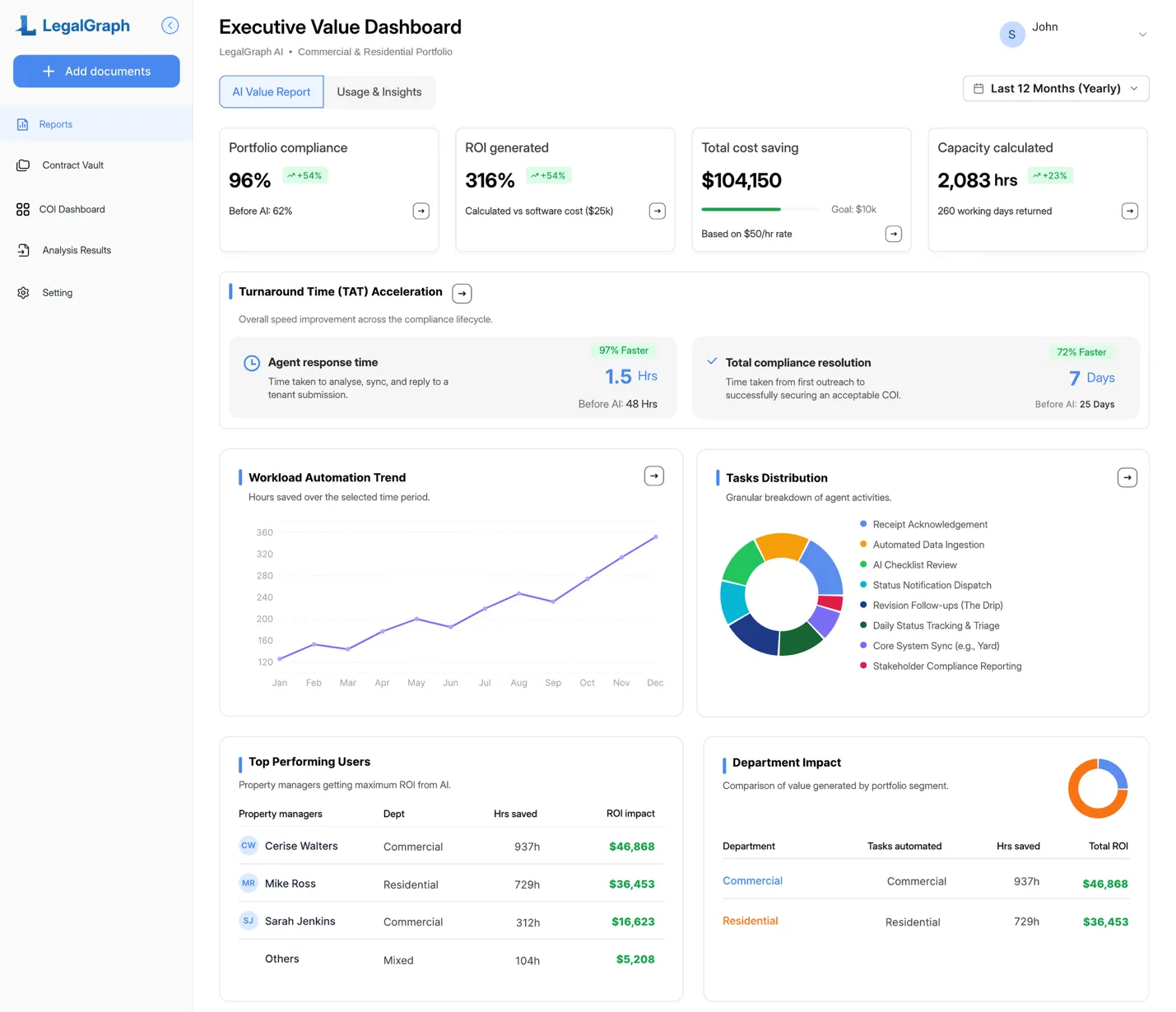
A number like “20 hours a week” is only worth anything if the customer can check it themselves. So it does not arrive as a quarterly slide from us — it is a live tab in their own dashboard. Reports is the executive-facing view of COI Agent, and it exists so that the person paying for the software can answer “what did this actually do for us” without asking anyone.
What sits on it:
- Portfolio compliance. The current compliance rate against the pre-AI baseline captured at onboarding, so the movement is measured from where they actually started. Behind it, a gap analysis lists every non-compliant tenant and contractor — which property, which unit, which property manager, and exactly which coverage is missing.
- ROI generated and total cost savings. Hard dollars saved, tracked against an annual savings goal the customer sets, plus the return as a percentage of what they pay for the software.
- Capacity created. Total hours saved, converted into standard working days returned to the team — the number that tends to mean the most to an operations lead.
- Turnaround time acceleration. Two clocks, each against the customer’s own pre-AI baseline: how fast the agent responds to a certificate, and how long a certificate takes to reach full compliance end to end. The breakdown shows where the time genuinely goes — waiting on the tenant, waiting on an internal audit, or how many reminders it took.
- Workload trend and task distribution. Hours saved over time, and what the agent actually spent that time on — reviews, ingestion, follow-ups, status notifications. Both are clickable down to the individual tasks behind them.
- Team and department impact. Which property managers are getting the most out of the agent and which need support, and how commercial compares with residential.
- A full audit log. Every automated action, with its timestamp, the accountable manager, the time saved and the dollar impact — exportable to CSV.
The reason this matters more than the individual widgets: the figures are instrumented, not asserted. Every action the agent takes writes a log entry with a benchmarked time saving against it. Cost savings are those logged hours multiplied by a blended hourly rate the customer sets themselves; ROI is that figure against what they pay us. Nothing on the page is a number we supplied — which is exactly why it survives contact with a CFO.
The whole view filters by period and by department, exports to a formatted PDF for board packs, and respects role: a director sees the entire portfolio, a department head sees their department, and a property administrator sees only their own properties.
Accuracy
We measured accuracy against the customer’s own 23-item tenant checklist, on real certificates, in the production environment. The most recent run covered 15 certificates — 345 individual compliance checks — between 8 and 15 June 2026.
| Metric | Earlier checklist | Current checklist (V2) |
|---|---|---|
| Overall accuracy (345 checks) | 71–81% | 93% |
| Recall — real gaps caught | — | 98% |
| Precision — flags that were real | — | 76% |
| Certificates scored 100% | — | 4 of 15 |
Of those 345 checks, 322 were correct and 23 were wrong: 20 false positives and 3 false negatives. Four certificates scored a clean 23 out of 23.
The gap between 98% recall and 76% precision is deliberate, and worth being direct about. A false negative is a real coverage gap the agent waved through — an uninsured liability nobody knows about. A false positive is the agent flagging something that turned out to be fine, which costs an administrator thirty seconds to dismiss. Those two errors are not equally expensive, so the system is tuned to over-flag rather than under-flag. Precision is the number we are actively improving; recall is the one we will not trade away to get it.
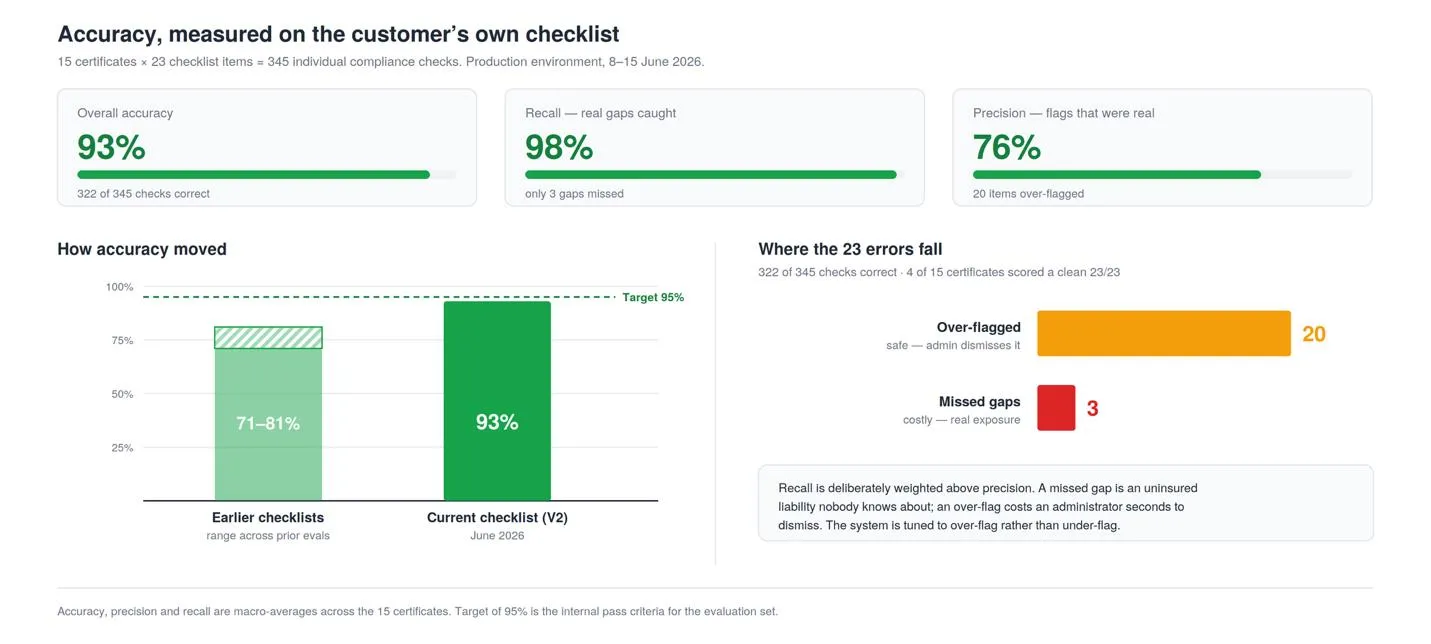
For context, earlier versions of the checklist scored between 71% and 81% on comparable evaluations. The improvement did not come from a better model — it came from encoding the checklist more precisely: tightening what counts as acceptable evidence for each item, and being explicit about the variations that appear on real certificates but not in the specification.
The property administrator still owns the final call. They review the flagged items and the cited evidence and decide what gets marked compliant — which is the point. The agent is accountable for doing the reading; the human stays accountable for the judgement.
What’s Next
COI Agent’s deployed scope today is tenant and vendor insurance compliance for real estate portfolios like Kaneff’s. We scoped it that way on purpose — to first prove the core capability: can an AI agent reliably do the granular, document-heavy compliance review that property managers currently do by hand, and show its work well enough to be trusted with it. Across the Kaneff deployment, it does.
The main direction from here:
- Procore integration for construction companies. The same autonomous ingestion, checklist audit and escalation workflow, extended to general contractors tracking subcontractor and vendor insurance across active job sites. The compliance problem is structurally identical; the difference is that on a job site, a lapsed certificate on an active subcontractor is a live exposure, not a paperwork gap.
Alongside that, we are continuing to push checklist precision portfolio by portfolio, and building out the risk analytics — like surfacing tenants with a repeated pattern of non-compliance — that Kaneff has already started using.
Get Started
If insurance compliance still lives in a spreadsheet at your company, we would like to show you what zero-touch looks like on your own portfolio. Every engagement starts with a paid 15–30 day Proof of Concept on one or two buildings, so you see the accuracy and the hours saved on your real certificates before any annual commitment.
See it here: allneurons.ai/coi
Book a demo: allneurons.ai/#request-demo
Or reach us directly at info@allneurons.ai